How to Migrate Off Stocky Before the August 31, 2026 Shutdown
How to Migrate Off Stocky Before the August 31, 2026 Shutdown
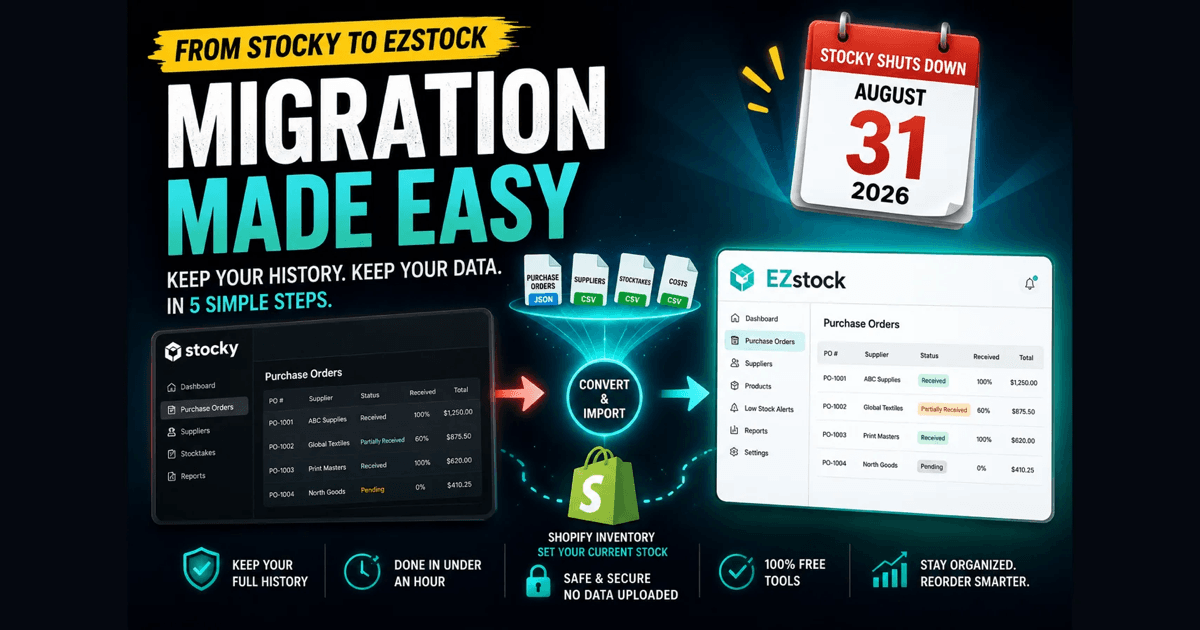
Shopify is retiring Stocky, its own inventory and purchase-order app, on August 31, 2026. If you run your reordering through Stocky, you have a hard deadline: export and move your data before that date, or lose it. This guide covers what actually transfers, the one mistake that quietly deletes your purchase-order history, and the exact steps to move everything across.
In one line: To migrate off Stocky before it shuts down on August 31, 2026, export your purchase orders, suppliers, stocktakes, and costs, convert the files so they keep their history, then import current stock into Shopify and your full purchase-order history into a dedicated inventory app. Most stores finish in under an hour.
What happens on August 31, 2026
Stocky stops working. The app is removed, and with it the only way to export your data. Anything still inside Stocky on September 1 is unrecoverable. There is no grace period and no archive to request later.
That matters because Stocky held things Shopify's core does not: your suppliers, their lead times, the cost you paid per SKU, and your full purchase-order history with statuses and received quantities. Shopify's built-in inventory tracks how much stock you have right now, per location, and nothing else. When Stocky leaves, that gap comes back.
The mistake that loses your history
Most store owners plan to export from Stocky, pick a new inventory app, and upload their purchase orders through Shopify's own CSV import to save a step. That import looks like the obvious path. It is also where the history disappears.
Shopify's import takes the product line items and drops them into a fresh draft purchase order. The status, the received quantities, the supplier link, and the cost you actually paid have nowhere to live in Shopify, so they are discarded. You end up with a list of products and none of the context that made the record useful.
This is not Shopify removing a feature. Its inventory was never built to store purchase-order history. Stocky was the bolt-on that filled the gap, and the import cannot recreate what Shopify has no field for.
What actually transfers
Before you move anything, it helps to know which data is portable and which you re-enter by hand.
- ▸Current stock counts: yes, through Shopify's Inventory import.
- ▸Purchase orders with status, received quantities, and costs: yes, after converting the file first.
- ▸Suppliers with names and lead times: yes, after converting.
- ▸Cost per item: yes.
- ▸Supplier notes (free text): no, copy them by hand.
- ▸Reorder points: no, re-enter them.
Everything except supplier notes and reorder points survives, as long as you convert the export before importing it.
The migration, step by step
The order is what keeps your data intact. Export first so nothing is lost, convert so the files import cleanly, then load current stock into Shopify and your history into a dedicated inventory app.
- ▸Export your purchase orders, suppliers, stocktakes, and cost list from Stocky. Use the Stocky API JSON export for purchase orders where you can, because it carries the cost paid and the received date a CSV leaves out.
- ▸Run each export through a converter so the file keeps status, received quantities, costs, dates, and suppliers instead of losing them on import. The free Stocky Export Converter does this in your browser, with nothing uploaded.
- ▸Import the converted stocktake into Shopify through Products then Inventory to set your current on-hand counts.
- ▸Import your suppliers and converted purchase orders into an inventory app that has a home for them. EZstock reconstructs whole purchase orders with their status, received quantities, and costs, so you are not re-keying years of records.
- ▸Spot-check a few purchase orders, then re-enter your supplier notes and reorder points, the two things no export carries.
For the full walkthrough with each screen, there is a step-by-step Stocky migration guide that covers every click. EZstock and the free converter are both part of the Extensions Market toolset for Shopify merchants.
Do it while Stocky still works
The single rule that matters: migrate before you uninstall Stocky, and before the deadline. The export path only exists while the app is installed and running. Export everything, convert it, confirm the imports look right, and keep your converted files somewhere you control. Only then remove Stocky.
Most stores finish the whole move in under an hour. The slow part is not the data. It is deciding to do it before the window closes.
Frequently Asked Questions
How long does a Stocky migration take?
For most stores, under an hour of active work: a few minutes to export each data type from Stocky, about a minute per file to convert, then the imports. The only slow part is re-entering supplier notes and reorder points, which no Stocky export carries.
Will I lose my purchase-order history when I leave Stocky?
Not if you convert the files first. Shopify's native import keeps only the line items and creates a draft, dropping status, received quantities, suppliers, and costs. Converting the export and importing it into an inventory app such as EZstock keeps the full history intact.
What happens to my Stocky data on August 31, 2026?
Stocky stops working and the export path disappears with it. Anything still inside Stocky on September 1 is unrecoverable. Export everything while the app is still installed and running.
Can I move my purchase-order history into Shopify itself?
No. Shopify has no native record for a purchase-order history, so it has to live in an inventory app. Shopify's own import creates a fresh draft and keeps only the line items.
Does the migration cost anything?
The Stocky Export Converter is free with no signup, and EZstock has a free plan, so moving your history and current stock does not force you onto a paid tier on day one.