Why Websites Die: What 1,031 AI Tool Sites Show
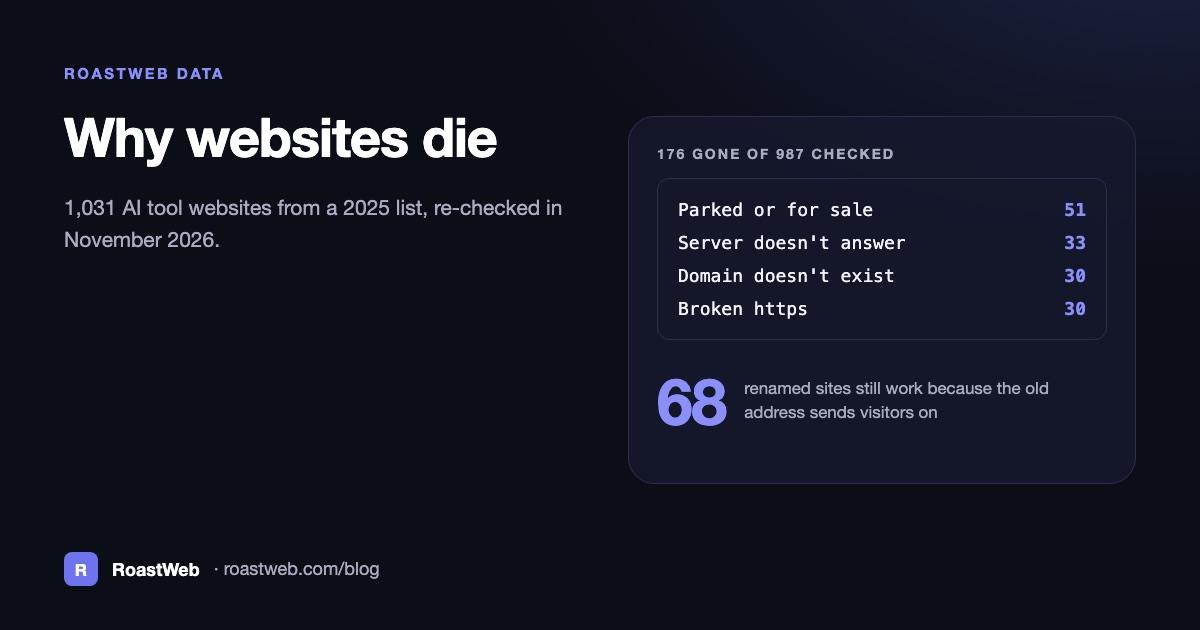
Of the 987 AI tool websites we could check in November 2026, 176 were gone. Most had lost their domain or their server, and not one had a page from its owner saying what happened. We found them when we re-checked all 1,031 websites on AI Platforms List's 2025 list of AI tools, a directory we also run, on November 8, 2026.
In one line: In a November 2026 re-check of 987 AI tool websites from a 2025 list, 176 (17.8%) were gone: 51 domains were parked or for sale, 33 servers didn't answer, 30 domains no longer existed and 30 had broken https, while 68 renamed tools still work because their old addresses lead to the new ones.
The quick version
- ▸81 of the 176 dead sites had a domain that was parked, for sale or no longer existed. Turn on auto-renew for yours, with a card that won't expire first.
- ▸Only 2 of the 30 broken https sites had an expired certificate. 27 others sent a certificate for another name or refused a secure connection, a sign that the domain still points at a host that no longer has the site.
- ▸9 of the 17 "page not found" errors were single pages on websites that still work. A 301 redirect from the old address would have kept those links alive.
- ▸68 tools changed their name or address and kept working, because the old address still sends visitors to the new one.
- ▸Only 5 sites on the list explain a shutdown on their own pages. Arc gave a date and Vellum gave a download deadline.
How we checked
A crawler opened each of the 1,031 websites once, with a 15-second limit, one request at a time per site, and a note in every request saying who we were. Every site that failed got two more tries, a few minutes later and about half an hour later, and only one of them answered on a later try. A person read every page that mentioned a shutdown or a sale, and sorted by hand the 105 sites that now open a different address. 44 sites blocked automated visits, so the numbers below cover the other 987.
How do websites die?
| What you see when you open it | Sites |
|---|---|
| Parked or for sale | 51 |
| The server doesn't answer | 33 |
| The domain doesn't exist anymore | 30 |
| Broken https (the certificate fails) | 30 |
| Page not found (404) | 17 |
| Server error (5xx) | 6 |
| Hosting turned off (402) | 5 |
| Stuck in a redirect loop | 2 |
| Taken over by gambling or streaming sites | 2 |
| All gone | 176 |
What each failure means and how to prevent it
Parked or for sale (51 sites)
A parked page has ads, a search box or an offer to buy the name, put there by a registrar or a domain seller when nobody runs a website on the domain. 9 of the 51 said so in the page title, such as "thya.ai for sale | Spaceship.com". Some of these names may never have been real products. For the rest, the owner stopped renewing and someone else registered the name, or the owner is selling it.
Turn on auto-renew at your registrar and keep a card on file that won't expire before the renewal date. Renewing for several years at a time gives you a longer margin if a card fails.
The server doesn't answer (33 sites)
The domain still points to a server, but nothing comes back. 22 of the 33 didn't answer at all within 15 seconds. A switched-off server, or a hosting account closed while the domain still points at it, looks like this from the outside.
An uptime monitor checks your homepage every few minutes and emails you when it stops answering. If you move to a new host, change the DNS records before you close the old account.
The domain doesn't exist anymore (30 sites)
For 30 sites, the name leads nowhere. DNS, the system that turns a domain name into a server address, has no answer for it. Either the registration ran out or the records that connect the name to a server were deleted.
Auto-renew covers the first case. For the second, copy every DNS record before you switch DNS providers, and check the site and your email right after the switch.
Broken https (30 sites)
A browser won't open a site whose certificate fails its checks, and shows a full-page warning instead. Only 2 of the 30 had a certificate that had expired. 10 sent a certificate made for a different name and 17 wouldn't start a secure connection for the name at all. Those 27 look like domains that still point at a host that no longer has the site set up. The last one sent an incomplete certificate chain.
Use a host or CDN that renews certificates on its own, and check that both the www and the bare version of your domain open over https. When you leave a host, point your DNS somewhere else instead of leaving it on the old servers.
Page not found (17 sites)
The server answers but says the page doesn't exist. 9 of the 17 were single pages on websites that still work, such as replicate.com/cog, deepgram.com/aura and inflection.ai/inflection-3. Each page was removed or renamed, and its old address wasn't sent anywhere. The other 8 were whole sites removed from hosts such as GitHub Pages and Framer while the domain still pointed there.
Before you delete or rename a page, add a 301 redirect from the old address to the closest page that still exists. Google's documentation says it uses a permanent redirect "as a signal that the redirect target should be canonical," so the new page takes over from the old one in search.
Server errors, paused hosting and redirect loops (13 sites)
6 servers answered with an error. 5 answered with status 402, which means payment required. Three of those pages said "Deployment Paused" and one said "Please renew your subscription." 2 sites sent visitors around a loop of redirects until the browser gave up.
Keep your billing details current with your host as well as your registrar. After any change to redirects, open your site with and without www, over http and https, and make sure each one ends on the same working page.
Taken over by gambling or streaming sites (2 sites)
The address amundsen.io now opens a football streaming site, and simpletransformers.ai opens an online gambling site. Every blog post, README and directory that linked to them now sends readers there. If you let a domain go, whoever registers it next gets every link that still points to it.
68 sites changed names and kept their links working
68 tools on the list work under a new name or address, and we counted them as working. Codium became Qodo, and codium.ai now opens qodo.ai. Danswer became Onyx, and danswer.ai opens onyx.app. Cursor moved from cursor.sh to cursor.com and v0 from v0.dev to v0.app, and both old addresses still lead to the product.
14 more were bought, and their old domains open the buyer's site. Both windsurf.com and codeium.com open devin.ai, and tecton.ai opens databricks.com.
Google's site move guide says to keep redirects "for as long as possible, generally at least 1 year," and adds that from your visitors' side you should "consider keeping redirects indefinitely." A domain costs little next to the links that point to it, so keep renewing the old one after a rename.
How do good shutdowns look?
Five sites that closed still say so on their own pages. Arc's page says "Arc is sunsetting on December 22, 2026." Vellum's says "Vellum's Personal Assistant Platform is shutting down. Download your assistant by December 13th, 2026". Reworkd's page still says "We'll be sunsetting the product on February 6, 2025," 21 months after that date, so anyone who follows an old link learns what happened.
A good closing page gives the date and tells people how to download their data before it. Keep the domain renewed and the page up for as long as old links keep bringing people in.
A checklist to keep your site alive
- ▸Auto-renew your domain and keep a card on file that won't expire first.
- ▸Use an email address you read for your registrar and hosting accounts, so renewal and billing warnings reach you.
- ▸Let certificates renew on their own through your host or CDN, for both www and the bare domain.
- ▸Watch your homepage with an uptime monitor that emails you when it stops answering.
- ▸Redirect old pages with a 301 when you move, rename or remove them.
- ▸Keep old domains after a rename and point them at the new site.
- ▸Close with a notice that gives a date and a way to download data.
Once the site is up, run a free RoastWeb scan to check its speed, SEO and how well AI search tools can read it. For what AI crawlers look for, see can ChatGPT read YC startup websites?, and for speed numbers from small business sites, what 430 website scans show.
Frequently Asked Questions
Why do websites go offline?
In our November 2026 check of 987 AI tool websites, the most common reasons were a parked or for-sale domain (51 sites), a server that didn't answer (33), a domain that no longer existed (30) and a broken https certificate (30). Auto-renew on the domain, current billing details with your host and careful DNS changes prevent most of them.
What does it mean when a domain is parked?
A parked domain has no website of its own, so the registrar or a domain seller shows ads or an offer to buy the name instead. It can mean the owner stopped renewing it and someone else registered it, the owner is selling it, or the name was never used for a real site.
Why does my site say the certificate is not valid?
The certificate doesn't match your address, has expired, or the server can't start a secure connection for that name. In our check only 2 of 30 broken https sites had an expired certificate. Most sent a certificate for another name or refused the connection, which can happen when a domain still points at a host that no longer has the site.
Should I keep my old domain after a rebrand?
Yes. Keep renewing it and send every old page to its new address with a 301 redirect. Google suggests keeping redirects for at least a year. 68 tools in our check work under a new name or address, and their old addresses still lead to them.
How many AI tool websites shut down?
Of the 987 AI tool websites from AI Platforms List's 2025 list that we could check in November 2026, 176 (17.8%) were gone and 10 more (1.0%) had shut down or were shutting down. Another 22 had been bought by other companies.
Does RoastWeb check whether my domain or certificate is about to expire?
No. A RoastWeb scan checks your homepage's speed, SEO and how well AI search tools can read it. For domains and certificates, turn on auto-renew at your registrar, let your host renew certificates, and use an uptime monitor.
Sources
- ▸AI Platforms List, "Almost 1 in 5 AI tools from 2025 is gone," November 8, 2026: the study linked at the top of this post. Its CSV lists all 1,031 websites with the result for each, free to use under CC BY 4.0.
- ▸Google Search Central, "Redirects and Google Search," retrieved November 8, 2026: https://developers.google.com/search/docs/crawling-indexing/301-redirects
- ▸Google Search Central, "Site Moves and Migrations," retrieved November 8, 2026: https://developers.google.com/search/docs/crawling-indexing/site-move-with-url-changes